
Understanding Triton: Basics, Blocks, and Offsetting
GPU Programming with Triton! Learn how Triton simplifies GPU kernel development with a block-based model, write high-performance computing code faster and easier.

1. Basics: What is Triton?
Triton is a Python-like programming language designed for writing GPU kernels. It provides a more convenient alternative to CUDA by simplifying the development process for high-performance GPU code.
Why Triton Over CUDA?
CUDA follows a scalar program + blocked threads model, where each kernel operates at the thread level, requiring explicit management of inter-thread communication (e.g., shared memory synchronization).
In contrast, Triton uses a blocked program + scalar threads approach. This means:
No need to manually manage threads.
The Triton compiler handles inter-thread communication automatically.
Simpler and more readable GPU kernel code.
Prototyping and experimenting ideas faster.
Installing Triton
To install Triton, ensure you have the necessary prerequisites:
Python 3.7+ (Check:
python --version)CUDA 11.4+ (Check:
nvcc --version)(Optional) PyTorch if you plan to use Triton with PyTorch (
pip install torch)
Install Triton via pip:
pip install tritonVerify the installation:
import triton
import triton.language as tl

print(triton.__version__)
2. Blocks/Programs: The Core of Triton’s Programming Model
CUDA’s thread-based model requires developers to manage individual threads and handle few more stuff manually. In contrast, Triton simplifies this process by abstracting thread management. Triton’s execution model is built around blocks rather than individual threads. Each block processes a chunk of data, abstracting away low-level thread management and making it easier to write high-performance GPU code.
Traditional CUDA Programming Model
Before diving into Triton, let's understand the traditional CUDA model:
// CUDA kernel example
__global__ void addVectors(float* x, float* y, float* out, int n) {
    int idx = blockIdx.x * blockDim.x + threadIdx.x;
    if (idx < n) {
        out[idx] = x[idx] + y[idx];
    }
}
In CUDA, threads are the basic unit of execution, with each thread processing a single data element. Multiple threads are grouped into thread blocks, which can communicate and execute on the same streaming multiprocessor (SM). These thread blocks are further organized into a grid. This three-level hierarchy—threads, blocks, and grids—forms the foundation of CUDA's execution model and requires developers to carefully manage thread indices, memory access patterns, and other optimizations to achieve optimal performance.
Triton’s block based Programming model
Triton’s execution model is built around blocks instead of individual threads. In Triton’s terminology a “Program” is a kernel instance processing a block of data. Each program processes a slice of data independently on a block. All computations in Triton are vectorized, ensuring efficient parallel execution. Additionally, Triton supports multi-dimensional blocks, allowing computations to be structured in 1D, 2D, or 3D layouts, making it adaptable to a wide range of workloads.
Let's break down a simple vector addition kernel in Triton.
@triton.jit
def vector_add_kernel(
    x_ptr,  # Pointer to first vector
    y_ptr,  # Pointer to second vector
    output_ptr,  # Pointer to output vector
    n_elements,  # vector length
    BLOCK_SIZE: tl.constexpr,  # Size of each block
):
    # Get the program ID
    pid = tl.program_id(axis=0)

    # Calculate starting offset for this block
    block_start = pid * BLOCK_SIZE

    # Generate offsets for elements in this block
    offsets = block_start + tl.arange(0, BLOCK_SIZE)

    # Create mask for boundary check
    mask = offsets < n_elements

    # Load data for this block
    x = tl.load(x_ptr + offsets, mask=mask)
    y = tl.load(y_ptr + offsets, mask=mask)

    # Perform addition
    output = x + y

    # Store results
    tl.store(output_ptr + offsets, output, mask=mask)
Kernel Definition: In Triton, the
@triton.jitdecorator is used to compile a kernel function for GPU execution. A Triton kernel usually takes data pointers and block configuration as parameters.@triton.jit def vector_add_kernel(...):Program Identification: In Triton, each program is assigned a unique identifier(similar to blockIdx in CUDA). The program identifier helps determine the portion of data a program will process in the computational grid. The axis parameter in
program_idspecifies the dimension of the 3D launch grid in which the block operates. Triton kernels utilize program identifiers along different axes to efficiently organize computations across multi-dimensional data structures like matrices and tensors, enabling optimal parallel execution. The axis parameter can take one of the following values:Axis 0 (X-dimension): Identifies the block along the width of the grid.
Axis 1 (Y-dimension): Identifies the block along the height of the grid.
Axis 2 (Z-dimension): Identifies the block along the depth of the grid.
pid = tl.program_id(axis=0)Data Access: In Triton, each program is an instance of the kernel that operates on a specific block (or tile) of data. Efficient data access requires calculating the correct memory locations for each program. This is done using the block’s starting index and offsets within the block to determine the exact elements being processed. A detailed discussion on data offsetting is covered later in this article.
block_start = pid * BLOCK_SIZE offsets = block_start + tl.arange(0, BLOCK_SIZE)block_start: Computes the starting index of data to be processed by the program by multiplying the program’s unique identifier (pid) with the block size (BLOCK_SIZE).offsets: Generates the memory addresses of data to be processed within the block by adding an index range (tl.arange(0, BLOCK_SIZE)) toblock_start.
Vectorized Operations: Triton’s execution model is built around blocks instead of individual threads. Each program processes a slice of data independently and computations are performed on entire blocks of data at once, maximizing parallel efficiency and simplifying GPU programming.
output = x + yLoad and Store Operations: load and store operations are used to transfer data between memory and computation units efficiently.
x = tl.load(x_ptr + offsets, mask=mask)
y = tl.load(y_ptr + offsets, mask=mask)

tl.store(output_ptr + offsets, output, mask=mask)
Load Operation
The load operation retrieves a tensor of data from memory at locations specified by a pointer.
Pointer (
triton.PointerType): Specifies the memory addresses from which data is loaded.Mask (
Block of triton.int1, optional): Ifmask[idx]isFalse, the data atpointer[idx]is not loaded. (For block pointers, the mask must beNone.)
Store Operation
The store operation writes a tensor of data into memory at locations defined by a pointer.
Pointer (
triton.PointerType): Specifies the memory addresses where the data will be stored.Value (
Block): The tensor containing elements to be stored.Mask (
Block of triton.int1, optional): Ifmask[idx]isFalse, the value atvalue[idx]is not stored atpointer[idx].
Parallel Computation with Blocks
To understand how Triton handles parallel computation with blocks, let's consider an example using 1D block processing.
Suppose we have two vectors, x and y, each of size 10, and we want to perform element-wise addition using blocks of size 4.
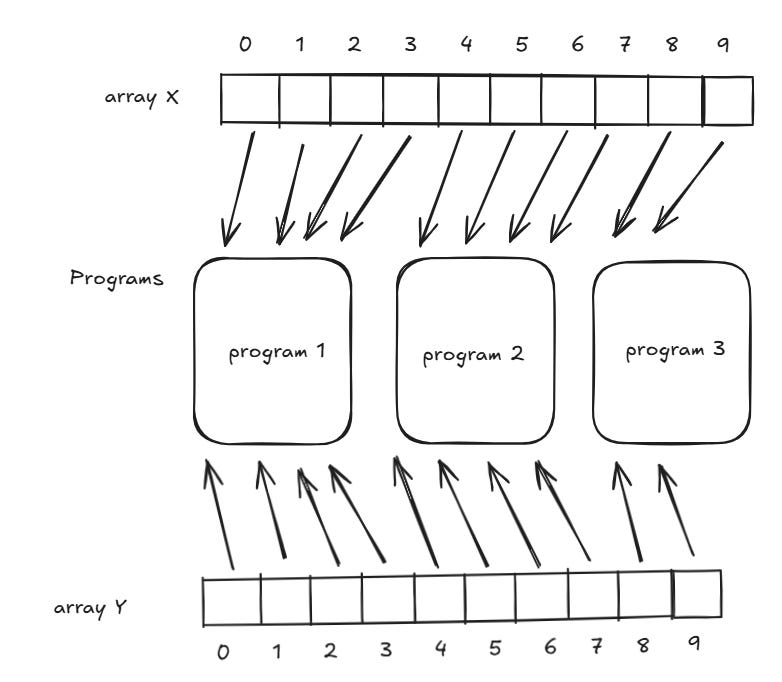
Since each block is of size 4, each program can process 4 elements, we need 3 blocks/programs (
10 // 4 ≈ 3).Each program operates on a separate portion of the data:
Block 1:
x[0:4] + y[0:4]Block 2:
x[4:8] + y[4:8]Block 3:
x[8:10] + y[8:10]
By dividing the computation into smaller, independent blocks, Triton ensures efficient parallel execution.
3. Data Offsetting: Accessing Data Efficiently
To ensure efficient execution, each program must correctly calculate memory offsets to access its designated portion of data.
Understanding Offsetting in Triton
Triton’s kernel execution is defined by a grid of programs, where:
Grid Size = Number of blocks (how many programs are launched).
Block Size = Number of elements each program processes.
Offsets = Determines where each program reads/writes data.
Offsetting with 1D Blocks
Consider a 1D tensor x with N elements, processed using blocks of size BLOCK_SIZE. Each program must determine its starting index:
pid = tl.program_id(0)
block_start_offset = pid * BLOCK_SIZE
where pid is the unique block identifier (or program ID). Once the starting offset is determined, the block slices its portion of the data using tl.arange().
offsets = block_start_offset + tl.arange(0, BLOCK_SIZE)
x_block = x[offsets]
Here, x_block contains only the elements that the current program is responsible for.
Offsetting with 2D Blocks
For matrix or image computations we use 2D blocks in Triton, where each program operates on a subset of rows and columns.
Example: A (M × N) matrix with blocks of (BLOCK_M × BLOCK_N) size:
Each block determines its starting row(row_id) and column(col_id) based on its unique identifiers.
row_id = tl.program_id(0) * BLOCK_M
col_id = tl.program_id(1) * BLOCK_N
To generate row_offsets and col_offsets addresses for the entire tile, use tl.arange() like this:
row_offsets = row_id + tl.arange(0, BLOCK_M)[:, None] # Rows indices of tile
col_offsets = col_id + tl.arange(0, BLOCK_N)[None, :] # Columns indices of tile
If the matrix is stored in row-major order(I have covered row-major order in other article here), the linear index for each element in the block can be computed as:
tile_indexes = row_offsets * N + col_offsets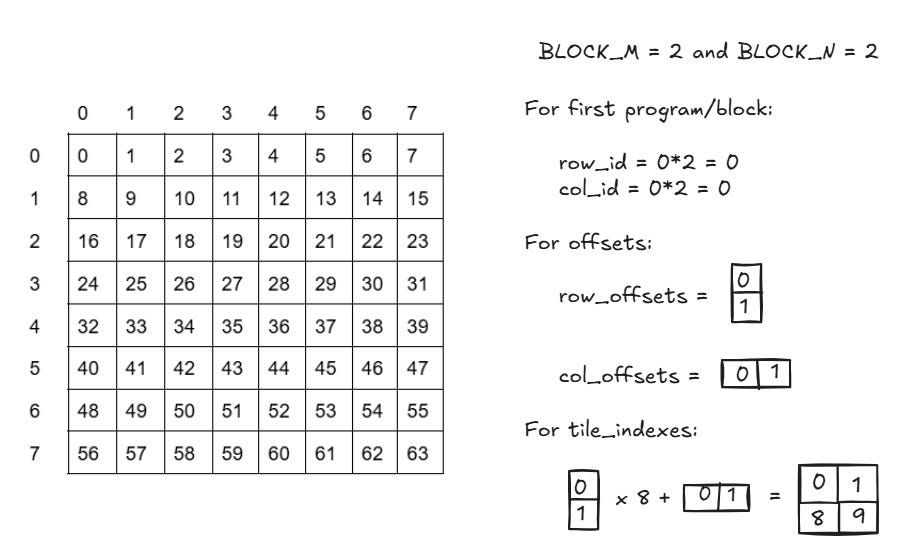
Each program processes a tile of the matrix, ensuring parallel execution across rows and columns.
Debugging with Triton’s Simulator Mode
Debugging GPU kernels can be challenging sometimes. Triton provides a Simulator Mode to debug kernels on the CPU instead of compiling them for the GPU and inspect the intermediate results of each operation. Enable it by setting TRITON_INTERPRET variable to 1:
export TRITON_INTERPRET=1This mode enables debugging features such as printing variables, inspecting intermediate results, and setting breakpoints, making it easier to analyze the program flow.
That's all for this article! Triton offers a high-level, Pythonic approach to writing efficient GPU kernels without the complexity of traditional CUDA programming. I’ll cover more Triton topics in the next article—drop a comment if there’s anything specific you’d like to see!
References
https://triton-lang.org/main/programming-guide/chapter-1/introduction.html
https://openai.com/index/triton/
https://developer.nvidia.com/blog/cuda-refresher-cuda-programming-model
https://christianjmills.com/posts/cuda-mode-notes/lecture-014/#conclusion-and-resources